
The Instagram collaboration feature is a powerful tool designed to double your post’s reach. It allows you to co-author content, sharing it across your profile and a partner’s simultaneously. This simple function is a good strategy for growing your community and impact.
Many creators in the Australia Experiences network already use this to expand their audience. This guide breaks down how to add a collaborator on Instagram effectively and turn any post into a shared success.
Key Insights
The Instagram collaborator feature lets two accounts co-author a single post or Reel, sharing visibility, engagement, and credit across both profiles.
This guide explains how to invite collaborators step-by-step and why the feature is a simple but powerful growth tool for creators and brands.
Collaborations multiply reach, build social proof, and strengthen authentic partnerships by merging two engaged communities.
Through Australia Experiences, creators can connect with over 20,000 travel enthusiasts and 100+ brands to find meaningful, audience-aligned collaborations.
- Step-by-step guide to inviting collaborators before and after posting.
- Key benefits: higher reach, shared engagement, and organic audience growth.
- Clarifies the difference between tagging and true collaboration.
- Australia Experiences connects creators and brands for impactful co-authored content.
What does it mean to Add a Collaborator on Instagram?
The collaborator feature on Instagram allows you to co-author a post or Reel with another account. When you invite someone to collaborate, the content appears on both profiles and shares the same set of likes, comments, and views. This process creates a seamless method to partner with creators, brands, or friends, which ensures both accounts receive full credit and engagement for the shared content.
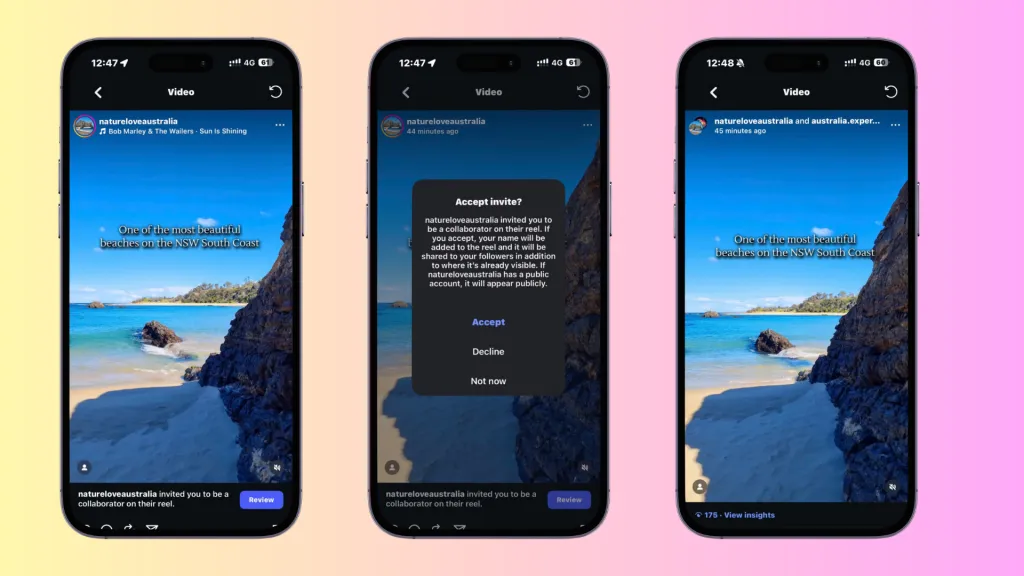
What does it mean to Add a Collaborator on Instagram?
Benefit of invite collaborators on instagram
The collaboration feature is a strategic tool to expand your presence and nurture your community. It is an effective way to cross-promote and introduce your content to a new, relevant audience. Below are several key benefits:
- Increased Reach and Engagement: Your post appears before two sets of followers. This significantly boosts its visibility and the potential for likes, comments, and shares.
- Authentic Partnerships: The feature allows for genuine collaborations with brands and fellow creators. It shows a unified partnership rather than a simple tag.
- Audience Growth: You can attract new followers who are interested in your content by tapping into your collaborator’s follower base.
- Shared Social Proof: All engagement metrics are consolidated into one post. This creates a powerful display of social proof with combined likes and comments.
How to add a collaborator on Instagram
The process to invite a collaborator is simple and integrated directly into the posting workflow. You can easily set up a collaboration in just a few taps before you publish your next photo or Reel.
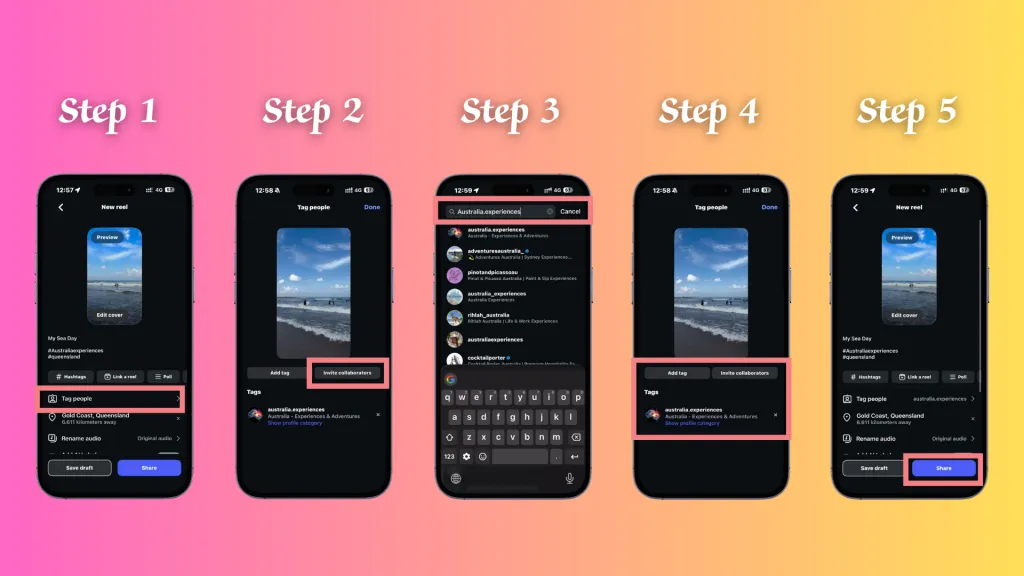
How to Add a Collaborator on Instagram
1. Create Your Post
Begin by creating a new post or Reel as you normally would. Tap the + icon, select your photo or video, apply your desired edits, and write a compelling caption.
2. Tag People
On the final screen before you share, you will see the “Tag People” option. Tap on it to proceed. This is the same screen where you would typically tag friends in a photo.
3. Add Collaborator
After you tap “Tag People,” two options will appear at the bottom: “Add Tag” and “Invite Collaborator.” Choose “Invite Collaborator” to start the collaboration process.
4. Search and Invite the Collaborator
A search bar will appear. Type the username of the account you wish to collaborate with and select them from the list. Once you select the correct account, their tag will appear on your post.
5. Wait for Collaboration Acceptance
After you publish the post, your chosen collaborator will receive an invitation in their direct messages. The post will appear on their profile grid and in their followers’ feeds only after they accept the request. Until then, the post is only visible on your profile.
Whom to invite as collaborators to increase your engagement?
The selection of the right collaborator is key to maximizing your post’s impact. You should look for partners whose audience and content align with yours to ensure the collaboration feels natural and provides value to both sets of followers.
A great way to find a relevant partner is by joining a community like Australia Experiences, which connects you with over 20,000 travel enthusiasts and offers the chance to partner with more than 100 brands. A collaboration within such a targeted community ensures your content reaches a highly engaged and relevant audience.
- Fellow Creators: Partner with influencers or creators in your niche.
- Brands You Admire: Collaborate with brands whose products or services you genuinely use and appreciate.
- Friends on an Adventure: If you are traveling with friends, invite them to collaborate on posts to share the memories.
- Event Organizers: If you attend a workshop, festival, or event, collaborate with the host’s account.
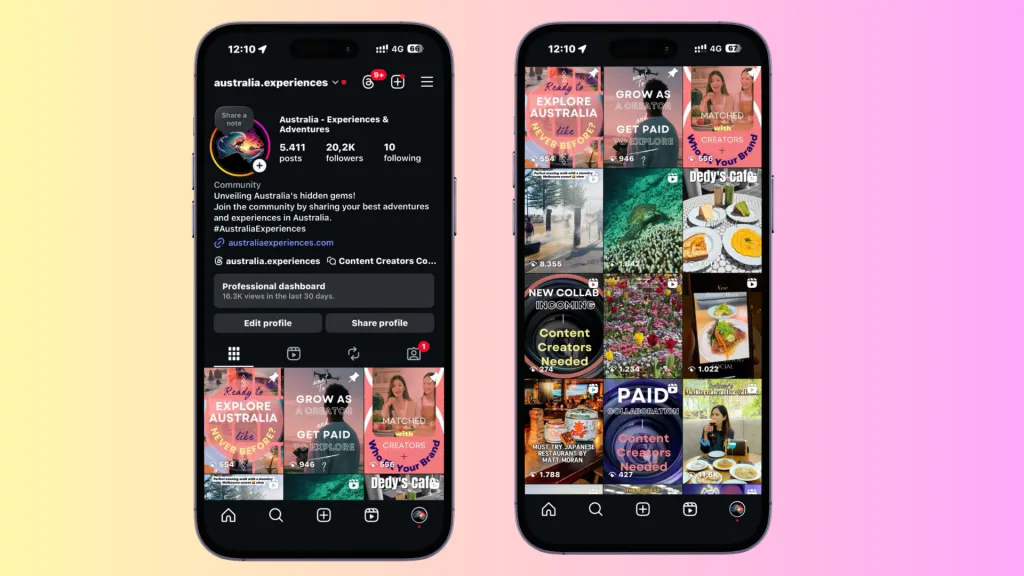
How do I add a collaborator on Instagram
If you would like to collaborate with us, you are always welcome to send us a DM or invite @Australia.experiences directly. We would love to connect and create meaningful content together.
Conclusion
The Instagram collaborator feature is a dynamic tool for the enhancement of your reach, engagement, and creative partnerships. It transforms individual posts into shared experiences, which allows you to connect with new audiences in an authentic way.
When you follow the simple steps detailed above, you can easily co-author content and grow your community. If you’re seeking a vibrant network of fellow travelers and creators, a community like Australia Experiences is an excellent place to start. Start to explore collaborations today to unlock new possibilities and share your stories more widely.
FAQs
Q1: How to invite collaborators on Instagram after posting?
Instagram now lets users add collaborators even after a carousel, post, or Reel has already been published. If your app is up to date, the steps are straightforward:, Open the Post or Reel and tap the three dots in the top right corner., Select “Edit.”, Choose “Tag People” and then “Add Collaborators.”, Search for the account, tap “Invite to Collaborate,” and send the request., Once the person accepts, the post or Reel will also appear on their profile.
Q2: Can you add a collaborator from Facebook Creator Studio or desktop?
No, you can’t. The collaborator feature is only available directly in the Instagram mobile app. While Creator Studio and desktop tools let you schedule, publish, or manage content, they don’t support inviting collaborators. If you need to add one, you’ll have to do it on the app at the time of posting.
Q3: Can you add multiple collaborators on Instagram?
Instagram only allows one collaborator per post or Reel. This means you can co-author with one account, and both of you will share likes, comments, and reach. If you want more people to be visible, you can tag them, but it won’t be the same as being a collaborator.
Q4: Can you add a collaborator to Instagram Reels?
Yes, you can invite a collaborator when posting a Reel. The process is the same as for feed posts - select “Invite Collaborator” before you publish. Once the other account accepts, the Reel will appear on both profiles with shared engagement metrics.
Q5: Is adding collaborators the same as tagging?
No, they’re different. Tagging just mentions another account in your post, while adding a collaborator makes the post appear on both profiles as if it’s co-owned. Collaborators share insights like reach, likes, and comments, while tagged accounts do not.